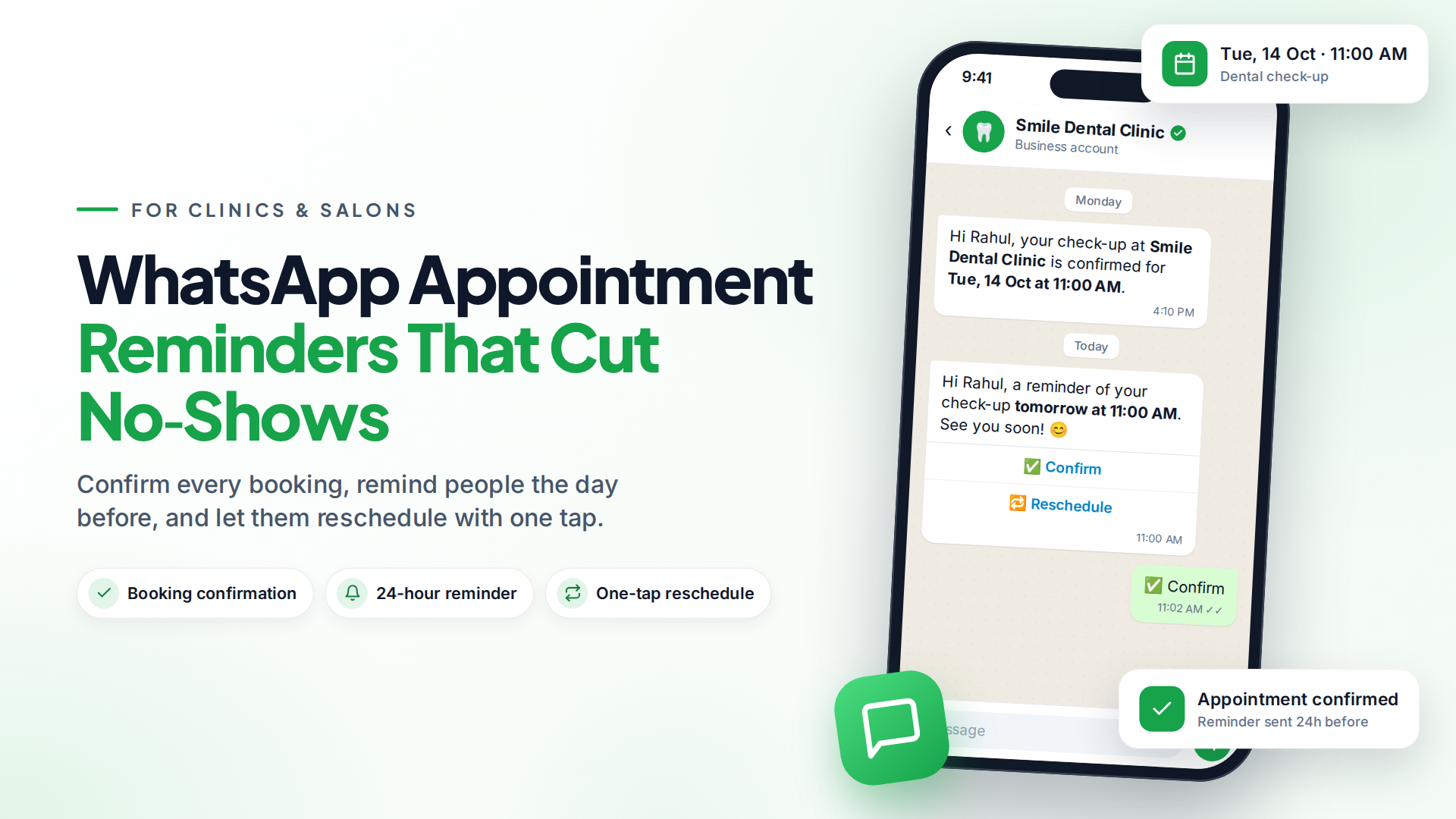
WhatsApp appointment reminders are automatic messages that confirm a booking and remind the customer shortly before it. They work because people read WhatsApp quickly, and they can reply "reschedule" instead of simply not turning up.
A typical setup sends three messages: a confirmation when someone books, a reminder about 24 hours before, and a short nudge 1–2 hours before. On the official WhatsApp Business Platform (the API), each of these is a utility template, a message format Meta approves in advance for transactional updates.
Do appointment reminders actually reduce no-shows?
Yes, the evidence says reminders help. A Cochrane review of seven studies (5,841 people) found appointment attendance was 67.8% with no reminder and 78.6% with a mobile text reminder (Cochrane, 2013). The same review found text reminders worked about as well as phone calls and cost less per attendance.
Those studies used SMS, not WhatsApp. The principle is the same, though: a timely, clear message makes people less likely to forget. WhatsApp adds two things SMS can't easily do: reply buttons ("Confirm", "Reschedule") and a real two-way chat when someone has a question.
Your own results will depend on your customers, your timing and how easy you make it to reschedule.
Who uses WhatsApp reminders?
Any business that loses money when a slot goes empty:
- Dental and medical clinics: check-ups, follow-ups, vaccination schedules.
- Salons, spas and barbers: appointments, plus a "time for your next cut?" follow-up.
- Physiotherapists and fitness trainers: session reminders across a course of treatment.
- Tutors and coaching centres: class reminders to students or parents.
- Consultants, lawyers and accountants: meeting reminders with the address or video link.
- Car service centres: service due dates and pickup-ready messages.
When should you send appointment reminders?
A three-message sequence works for most businesses:
| Message | When | Purpose |
|---|---|---|
| Confirmation | Right after booking | Confirms date, time and place. Catches wrong bookings early. |
| Reminder | About 24 hours before | Gives time to reschedule and free the slot for someone else. |
| Final nudge | 1–2 hours before | Short "see you soon", with address or video link. |
For appointments booked weeks ahead, add a reminder 2–3 days before. For same-day bookings, skip straight to the final nudge. Don't send more than this. Too many reminders feel like nagging and increase blocks.
Sample WhatsApp reminder templates
Here are examples you can adapt. Words in {{double braces}} are variables filled in for each customer. Submit them as Utility templates in WhatsApp Manager or your messaging platform.
Confirmation
Hi {{1}}, your appointment at {{2}} is confirmed for {{3}} at {{4}}. Reply to this message if you need to change it.
24-hour reminder (with buttons)
Hi {{1}}, a reminder of your {{2}} appointment tomorrow, {{3}} at {{4}}. Buttons: Confirm · Reschedule
Final nudge
See you at {{1}} today, {{2}}! Our address: {{3}}. Reply here if you're running late.
Tips that help approval and results:
- Keep it transactional. Don't add offers ("book another service for 10% off") to a utility template. Meta may re-categorise it as marketing, which costs more. Our guide to getting templates approved explains the categories.
- Name your business so people instantly know who is writing.
- Make rescheduling easy. A reschedule button that reaches your team keeps the slot from going empty.
For clinics, avoid putting diagnosis or treatment details in reminders. The date, time and place are enough.
How much do WhatsApp appointment reminders cost?
On the WhatsApp Business Platform, Meta charges per delivered template message. The rate depends on the category (utility for reminders) and the recipient's country (Meta pricing). Utility templates are usually cheaper than marketing ones, and volume tiers lower the rate as you send more.
One change to know about: from 1 October 2026, Meta also charges for replies and utility templates sent inside the 24-hour customer service window, which used to be free (Meta's update).
Worked example (hypothetical). Imagine a dental clinic with 400 appointments a month that sends a confirmation and one 24-hour reminder. That's 800 utility templates a month. To estimate your bill, multiply by the utility rate for your country on Meta's rate card. Then compare it with what a few empty chairs cost you. For most clinics, one or two saved appointments cover the month's messages.
See our WhatsApp API pricing guide for how the billing works.
How to connect your booking system to WhatsApp
Most booking tools can tell another system when something happens, using a webhook (an automatic message from one app to another, for example "new booking created").
The setup looks like this:
- Create the automation. In your messaging platform, create an automation that starts when a webhook is received. It gives you a private URL.
- Point your booking tool at it. In your booking tool's settings, add that URL for the booking created event. Many tools also let you send a webhook at a time offset, such as 24 hours before the appointment, which is ideal for reminders.
- Send the template. In the automation, add a send template step and map the booking details (name, service, date, time) into the template's variables.
- Add opt-in. Put a clear checkbox on your booking form: "Send me appointment updates on WhatsApp from [your business]." Meta requires opt-in that names your business (Meta opt-in guidance).
- Test with your own number before switching it on.
In Omni, the automation builder has a Webhook received trigger for exactly this, so booking data such as the service name and appointment time can be used inside the message. If you take bookings through chat instead, Omni can also book appointments into Google Calendar and create video links from inside a flow, when that integration is switched on for your platform.
What if a customer replies to the reminder?
Replies come back into your inbox as normal chats. That's where WhatsApp beats SMS: someone can ask "Can I come at 5 instead?" and your front desk answers straight away.
Two practical tips:
- Route reminder replies to the front desk, not a general queue, so rescheduling happens fast.
- Let a chatbot handle simple questions like parking or opening hours, and hand everything else to a person. Our guide to a shared team inbox shows how several staff can share one WhatsApp number.
Common mistakes to avoid
- Sending from a personal phone. Reminders stop when that person is off sick or leaves. Use a business number on the API.
- No opt-in. Messaging people who didn't agree leads to blocks, reports and a lower quality rating.
- Wrong time zone. A reminder at 3am annoys everyone. Check your account and booking tool use the same time zone.
- Nobody watching replies. A reminder that invites "reply to reschedule" needs someone to answer.
Sources
Frequently asked questions
Can I send WhatsApp appointment reminders from the WhatsApp Business app?
Only by hand, one at a time or with broadcast lists. Automatic reminders triggered by your booking system need the WhatsApp Business Platform (API) and approved templates.
Are appointment reminders marketing or utility messages?
They are utility messages, as long as they only cover the appointment itself. Adding promotions can get the template re-categorised as marketing, which usually costs more.
How many reminders should I send?
Usually a confirmation at booking and one reminder about 24 hours before, plus an optional short nudge 1–2 hours before. More than that tends to annoy people.
Do I need patient or customer consent to send reminders?
Yes. Meta requires opt-in that clearly names your business, and local privacy laws may add their own rules. A checkbox on your booking form is the simplest way to collect it.
What booking tools work with WhatsApp reminders?
Any booking tool that can send a webhook when a booking is created or before an appointment can trigger WhatsApp reminders. Check your tool's automation or integration settings for "webhook" or "HTTP request".
- #appointment reminders
- #whatsapp templates
- #clinics
- #salons
- #no-shows
The Omni Team
The Omni team builds the shared inbox, AI chatbots and automation tools businesses use to talk to customers on WhatsApp, Instagram and Messenger.
Put this into practice with Omni
One inbox for WhatsApp, Instagram and Messenger, with AI chatbots, campaigns and automation. Start on the free plan.