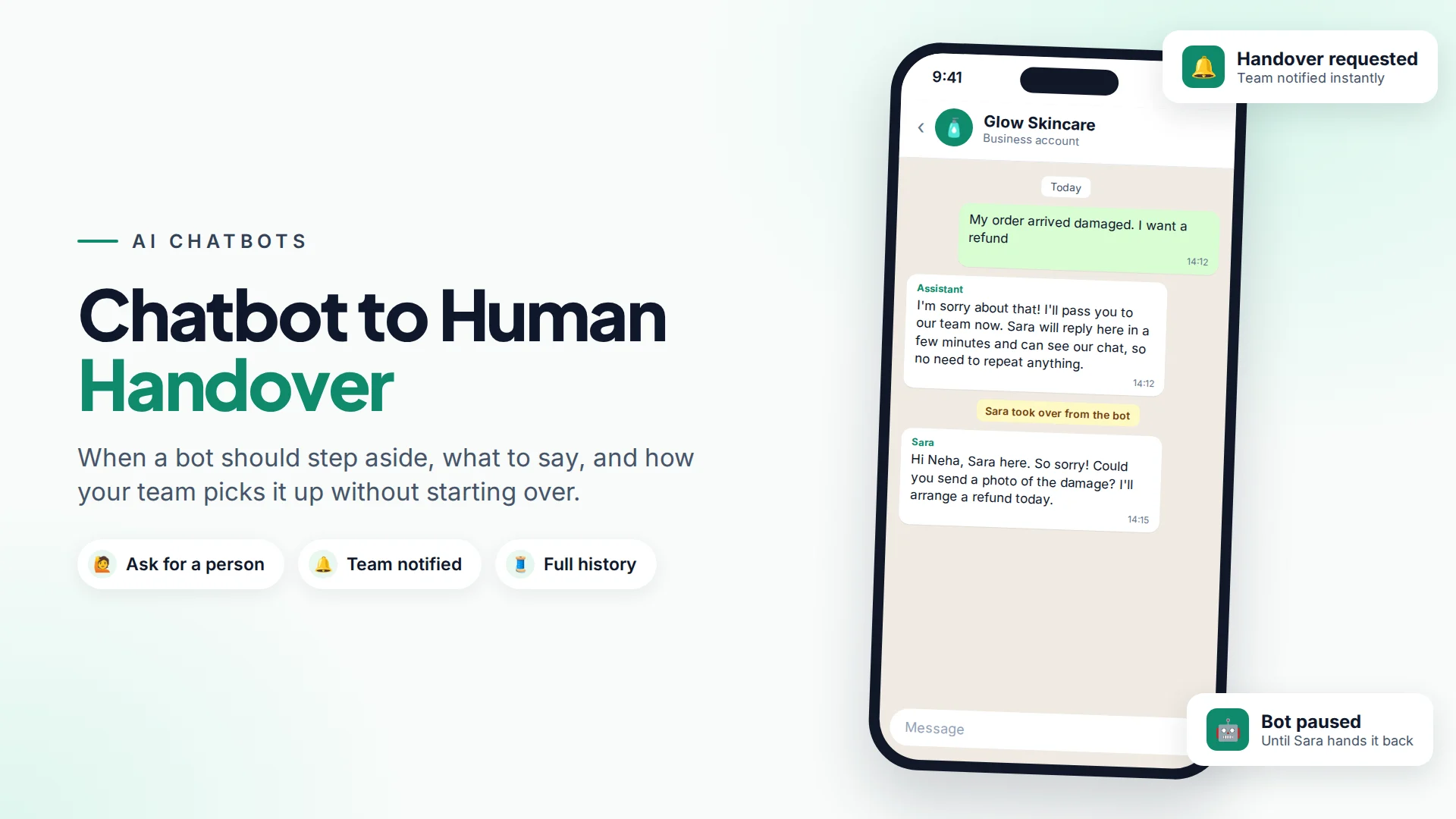
Chatbot to human handover is the moment a bot stops replying and a person on your team takes over the conversation, with the full chat history in front of them. It should happen whenever a customer asks for a person, when the bot can't answer confidently, or when the topic involves money, complaints or anything sensitive.
Done well, handover is what makes customers trust a chatbot. They relax when they know a real person is one message away.
Why does human handover matter?
A chatbot that traps people is worse than no chatbot. Customers who can't reach a person get frustrated, repeat themselves, and on WhatsApp may block or report your number.
It's also a policy requirement. WhatsApp's Business Messaging Policy says businesses "may use automation when responding during the 24-hour window, but must also have available prompt, clear, and direct escalation paths". It lists acceptable paths such as in-chat transfer to a human agent, a phone number, email, web support, a store visit or a support form.
Meta also changed its WhatsApp Business Solution terms from 15 January 2026 to bar general-purpose AI assistants from the platform, as TechCrunch reported. Bots that serve your own customers, for support, bookings or order questions, are still allowed. A clear route to your team keeps your bot firmly in that category.
When should a chatbot hand over to a human?
Hand over in these situations:
| Situation | Example | Why a person is better |
|---|---|---|
| The customer asks | "Can I talk to someone?" | Always respect it, immediately |
| The bot doesn't know | A question not in the knowledge base | Guessing damages trust |
| Money is involved | Refunds, disputes, custom quotes | Needs judgement and authority |
| Emotions are high | Complaints, angry or upset messages | People want to be heard |
| High-value sales | "I want 50 units for my office" | A person closes better |
| Sensitive topics | Health, legal, account security | Risk of harm if wrong |
| The bot is going in circles | Same question twice | The bot isn't helping |
A simple rule: the bot handles the questions you'd happily answer with a saved reply. Everything else goes to a person.
How should the handover message sound?
Tell the customer three things: a person is taking over, roughly when they'll reply, and that they don't need to repeat themselves.
During business hours:
I'll pass you to our team now. Sara will reply here in a few minutes, and she can see our chat so far, so there's no need to repeat anything.
After hours:
Our team is offline right now (we're back at 9am). I've passed your message on and someone will reply here first thing. If it's urgent, call us on 020 5555 0100.
What to avoid: pretending the bot is a person, promising a reply time you can't keep, or handing over silently so the customer thinks they've been ignored.
What makes a handover smooth for your team?
The person taking over should be able to help in their first reply, without asking questions the bot already asked. That needs:
- The full conversation in the same thread, including the bot's answers.
- Who said what (customer, bot or teammate).
- Customer details: name, number, past conversations and orders.
- A notification so someone actually picks it up.
- Clear ownership: the conversation assigned to one person.
- The bot staying quiet once a person has taken over.
How to set up chatbot handover in Omni
In Omni, an AI chatbot assigned to a WhatsApp number, Facebook Page or Instagram account answers new messages from your own knowledge base. Handover to your team happens in three ways:
- The customer asks for a person. Messages containing phrases such as "talk to human", "speak to agent", "real person", "live agent" or "transfer me" switch the conversation to human mode automatically, and your team members are notified.
- A teammate takes over. Anyone in the team inbox can take over a conversation from the bot, or hand it back to the bot later. Once a conversation is in human mode, the bot stops replying.
- An automation decides. In an automation, you can use an AI step to branch on what the customer meant, then use the assign to agent step, which hands the conversation to a person (or a specific teammate) and stops the bot.
Each message in the conversation shows whether it came from a person, the bot or a campaign, so the teammate sees exactly what the customer has already been told.
Tip: put the handover rule in the chatbot's instructions too, for example: "If the answer isn't in the knowledge base, or the customer is upset or asks about a refund, say you'll connect them with the team." Then test it in the chatbot playground before going live.
How to check your handover is working
- Test it yourself from a personal phone: ask for a person and check someone is notified.
- Read a handful of handovers each week. What did people ask right before? Add those answers to the knowledge base if a bot could handle them.
- Watch first response time after handover. A fast bot followed by a two-hour wait feels worse than no bot. Our guide to customer service metrics covers what to track.
- Mind the reply window. On Instagram and Messenger you can only reply within 24 hours of the customer's last message, so hand-offs there need quick pickup. See Instagram DM automation.
Common handover mistakes
- Hiding the human option. If people have to fight the bot to reach you, they'll leave.
- Handing over with no one available. Say when you're back, and give another route for urgent issues.
- Making customers repeat everything. Keep the conversation in one thread.
- Bot and person replying at once. The bot must stop when a person takes over.
- Never handing back. Once a person resolves the issue, the bot can handle the next simple question.
For building the bot itself, read how to build a WhatsApp AI chatbot that answers from your own content.
Sources
Frequently asked questions
Is a human handover required on WhatsApp?
WhatsApp's Business Messaging Policy says businesses using automation must have prompt, clear and direct escalation paths. An in-chat transfer to a person is one option; a phone number, email, support form or website support are others.
How does a chatbot know when to hand over?
Common triggers are the customer asking for a person, the question not being covered by the bot's knowledge, and sensitive topics like refunds or complaints. You can combine phrase detection, instructions in the bot's prompt and automation rules.
What should the customer see during a handover?
A short message saying a person will take over, roughly when they'll reply, and that they don't need to repeat themselves. After hours, say when the team is back and offer an urgent contact option.
Does the chatbot keep replying after a person takes over?
It shouldn't. In Omni, once a conversation is switched to a person, the bot stops replying until a teammate hands it back.
Can I still use an AI chatbot on WhatsApp after Meta's 2026 policy change?
Yes, for your own business: support, bookings, order questions and similar services are allowed. What Meta barred from January 2026 are general-purpose AI assistants offered as the product itself.
- #chatbot handover
- #human handoff
- #ai chatbot
- #customer support
- #whatsapp chatbot
The Omni Team
The Omni team builds the shared inbox, AI chatbots and automation tools businesses use to talk to customers on WhatsApp, Instagram and Messenger.
Put this into practice with Omni
One inbox for WhatsApp, Instagram and Messenger, with AI chatbots, campaigns and automation. Start on the free plan.