Facebook Messenger lets customers message your Facebook Page, and you can reply to them freely, including with offers, for 24 hours after their last message. After that window closes, your options shrink to a short list of Meta-approved message types. So Messenger works best as a fast, friendly support and sales channel for people who contact you first, not as a broadcast list.
This guide covers the rules as they stand in September 2026, what you can safely automate, and how to handle Messenger without adding yet another app for your team to watch.
Who is Messenger for business a good fit for?
Messenger is a good fit if people already find you on Facebook. That usually means local businesses, shops, restaurants, salons, clinics, tutors and event organisers whose customers browse the Page, see a post or an ad, then tap Message.
It's a weaker fit if you need to contact people first. Unlike WhatsApp, Messenger has no approved "template" you can send to someone who has never written to you.
| You want to… | Messenger | |
|---|---|---|
| Answer questions from Facebook visitors | Great | Good (if they have your number) |
| Reply within 24 hours of their message | Free-form, promotions allowed | Free-form |
| Message someone who never wrote to you | Not possible | Possible with an approved template |
| Send reminders days later | Very limited | Utility templates |
| Promote offers to past chatters | Paid options only (see below) | Marketing templates |
Many businesses use both: Messenger to catch people on Facebook, WhatsApp for reminders and follow-ups. For a full channel comparison, see WhatsApp vs SMS vs email.
How does the Messenger 24-hour window work?
The 24-hour window is the period after a customer's last message in which your Page may send them any message. Meta calls it the Standard Messaging Window, and its Messenger send API guide says messages inside it "may contain promotional content".
The clock restarts every time the customer writes. Your own replies don't restart it.
For example: a customer asks about your opening hours on Monday at 10:00. You can reply, follow up and even mention this week's offer until Tuesday at 10:00. If they reply on Monday at 18:00, the window runs until Tuesday at 18:00.
What changed with Messenger message tags in 2026?
Message tags used to let Pages send certain updates outside the window, such as booking confirmations or order updates. Meta has been retiring them. The Messenger send API guide states that from 27 April 2026, requests using the CONFIRMED_EVENT_UPDATE, ACCOUNT_UPDATE and POST_PURCHASE_UPDATE tags receive an error.
The Human Agent tag still exists. It lets a real person (not a bot) reply to a message within 7 days, for cases that need a human to follow up. Access to it is a permission the business's Meta app must be approved for.
If you want to reach people after the window for marketing, Meta points businesses to Sponsored Messages (paid ads delivered in Messenger) and One-Time Notifications, as described in the same guide. Each has its own rules, so read Meta's page before planning around them.
The practical takeaway: reply fast. Most Messenger problems come from replying on day two, when Meta will no longer accept the message.
What can you automate on Messenger?
You can automate anything that answers a customer inside the 24-hour window. Good candidates:
- Instant first replies. Acknowledge the message and set expectations ("We usually reply within 15 minutes, 9am–7pm").
- Common questions. Opening hours, prices, delivery areas, booking links, where to park.
- Collecting details. Ask for a name, phone number or order number before a person steps in.
- Routing. Send sales questions to one person and complaints to another.
- Hand-off to a human whenever the customer asks for one.
Avoid automating anything that pretends to be a person, or that keeps someone chatting just to hold the window open. Meta's Messenger Platform policy expects bots to be clear about when a person is available.
Example: a Messenger flow for a local business
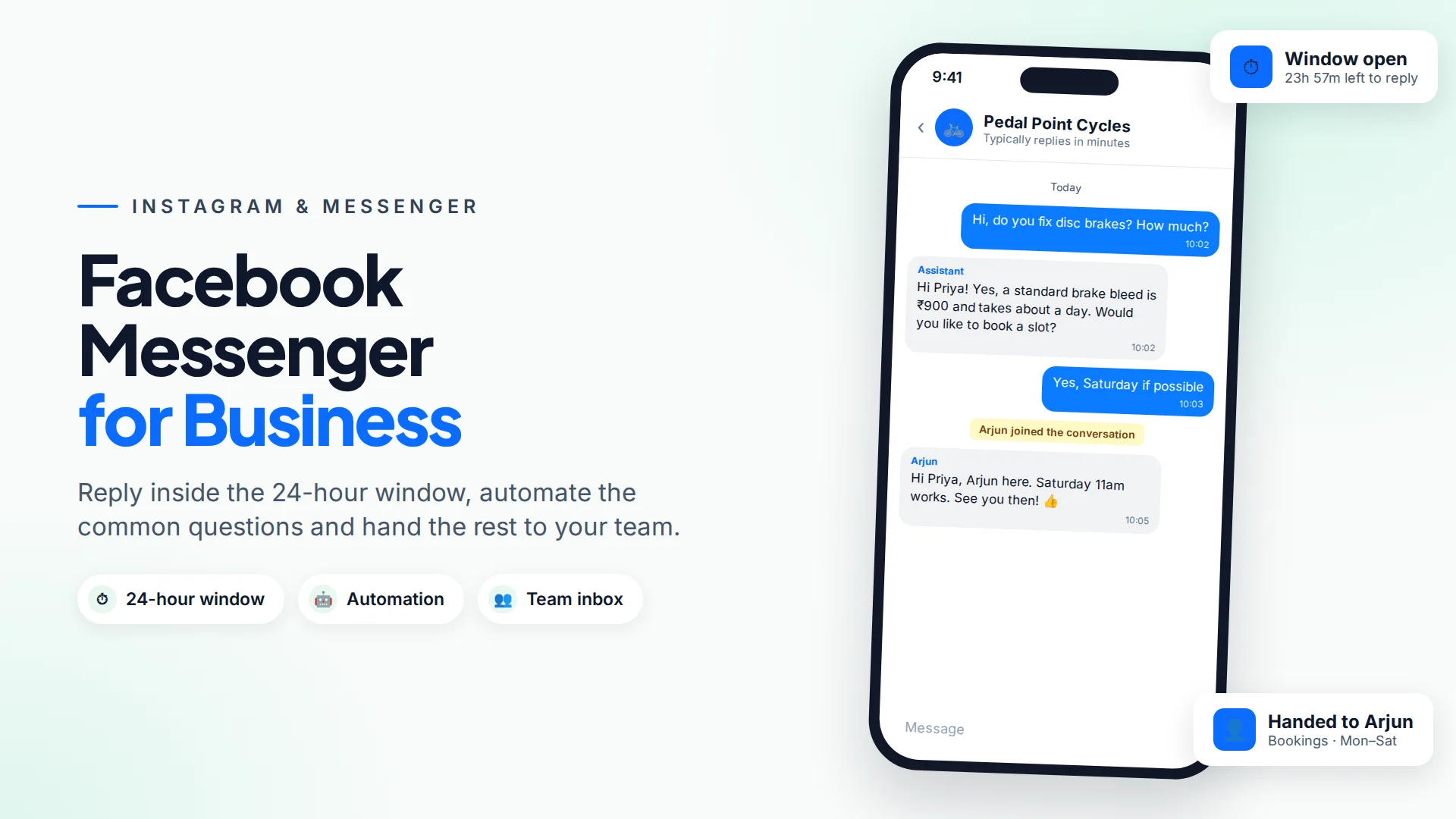
For example, imagine a bicycle repair shop that gets 20 Messenger questions a day.
Customer: Hi, do you fix disc brakes? How much? Bot: Hi Priya! Yes, we service disc brakes. A standard bleed is ₹900 and takes about a day. Would you like to book a slot? Customer: Yes, Saturday if possible Bot: Great. I'll pass this to Arjun, who manages bookings. He'll confirm your time here within 30 minutes (Mon–Sat, 9am–7pm).
The bot answers from the shop's own price list, collects the intent, and hands the booking to a person well inside the window. Nobody has to watch the Page all day.
How to set up Messenger for your business
- Make sure you're an admin of the Facebook Page. Only admins can connect it to a messaging tool.
- Turn on messaging on the Page and set an accurate response-time expectation.
- Connect the Page to a shared inbox so several people can reply and see who's handling what.
- Write 10–15 saved replies for your most common questions.
- Add a chatbot or instant reply for after-hours messages, with a clear route to a person.
- Check your response times weekly. If replies slip past a few hours, add cover at busy times.
Running Messenger from one inbox with Omni
In Omni you connect a Facebook Page from Inbox → Channel setup by logging in with Facebook and choosing the Page (step-by-step guide). Messenger conversations then land in the same team inbox as WhatsApp and Instagram, with assignments, internal notes, labels and canned replies.
A few things Omni does specifically for Messenger:
- It enforces the 24-hour window before sending. When the window has closed, the conversation shows the date of the customer's last message and locks the reply box, instead of letting you send something Meta will reject.
- You can assign an AI chatbot to the Page. It answers from your own knowledge base (price lists, FAQs, web pages) and stops replying when a teammate takes over, or when the customer asks for a real person.
- Automations can listen for Messenger messages. The Message received trigger fires for Messenger too, and send steps can reply on Messenger (text and images) inside the window. See automations.
The Human Agent tag is built into Omni but is only used when the platform has Meta's approval for it, so plan around the standard 24 hours.
One honest caveat: connecting a Page needs the Facebook account you log in with to have access to Omni's Meta app. If the Page list comes back empty, contact support and they'll help enable it.
Common mistakes on Messenger
- Replying the next day. The window may already be closed. Aim for same-hour replies in business hours.
- Importing a contact list and expecting to message it. Messenger can't message people who haven't written to your Page.
- Bots with no exit. Always offer a person, and say when one is available.
- Treating comments as messages. A comment on a post doesn't open the Messenger window.
- One person owning the Page inbox. When they're off, messages go unanswered. Share the load in a team inbox.
For the same rules on Instagram, read Instagram DM automation: what's allowed.
Sources
Frequently asked questions
Can I send a Facebook Messenger broadcast to everyone who ever messaged my Page?
Not for free. Outside the 24-hour window, Meta points businesses to paid Sponsored Messages or to One-Time Notifications, each with its own rules. Inside the window you can reply to each person individually.
Does replying to a customer extend the 24-hour window?
No. Only the customer's own messages restart the 24-hour clock. Your replies don't extend it.
Is the Human Agent tag still available on Messenger?
Yes. As of September 2026, Meta's documentation still lists the Human Agent tag, which lets a real person reply within 7 days. Your messaging app needs Meta's approval to use it, and it can't be used for automated or promotional messages.
Can a chatbot answer Messenger messages for my Page?
Yes, as long as it replies within the 24-hour window and gives customers a way to reach a person. In Omni, you assign an AI chatbot to the connected Page and your team can take over any conversation.
Do I need a separate app for Messenger, Instagram and WhatsApp?
No. A shared inbox such as Omni puts all three channels in one place, so your team sees every conversation and who is handling it.
- #facebook messenger
- #messenger automation
- #24-hour window
- #customer support
- #facebook page
The Omni Team
The Omni team builds the shared inbox, AI chatbots and automation tools businesses use to talk to customers on WhatsApp, Instagram and Messenger.
Put this into practice with Omni
One inbox for WhatsApp, Instagram and Messenger, with AI chatbots, campaigns and automation. Start on the free plan.