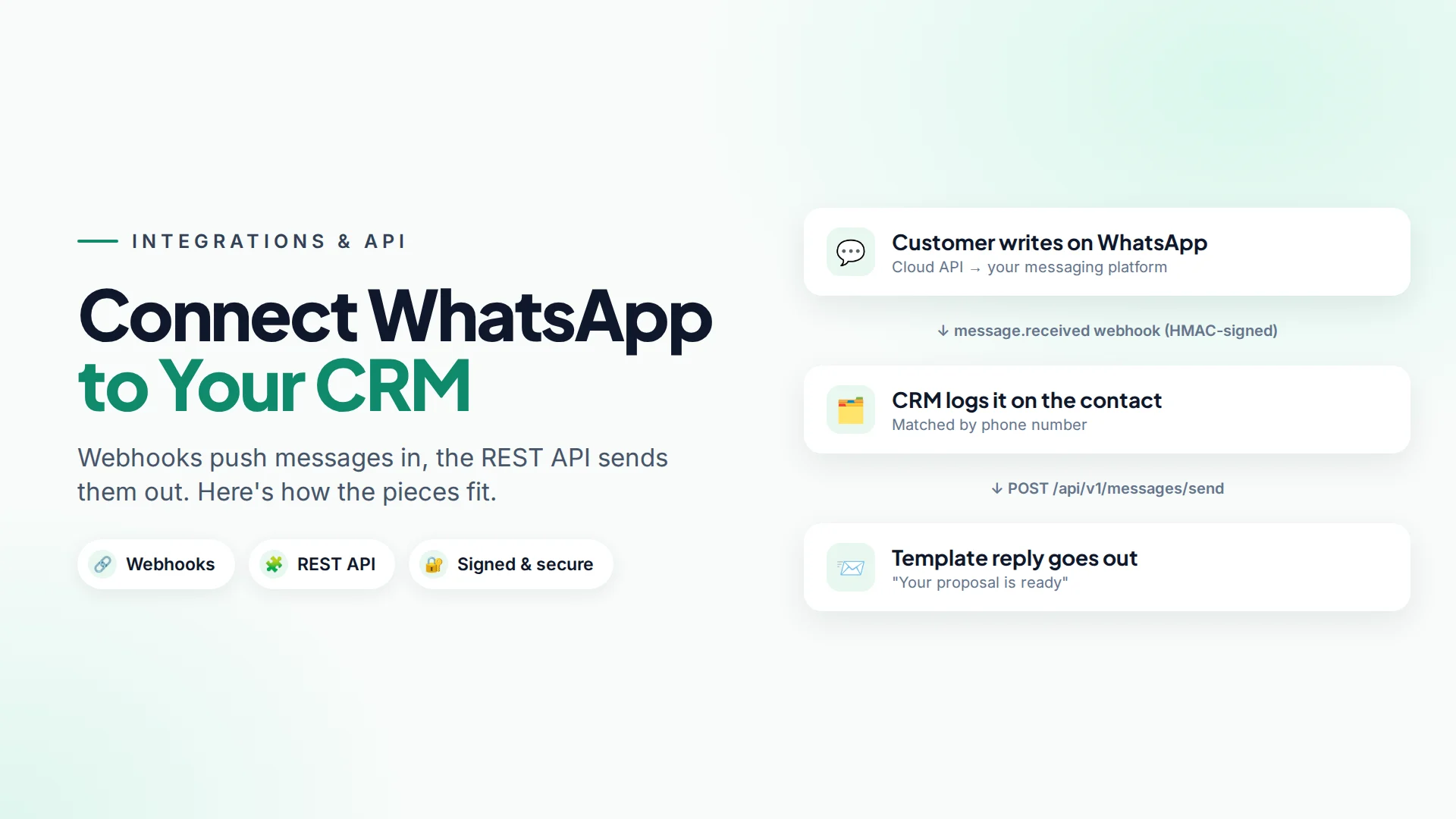
To connect WhatsApp to your CRM, you set up data flowing in two directions: webhooks push new WhatsApp messages and contacts into the CRM as they happen, and a REST API lets the CRM send messages and update contacts. You rarely connect a CRM to Meta's WhatsApp Cloud API directly. It's usually simpler to go through a messaging platform that already handles the WhatsApp connection, templates and inbox, and integrate with that.
This guide explains the moving parts in plain words, then shows five integrations businesses build most often.
Do you need a developer to connect WhatsApp to a CRM?
It depends on your CRM:
| Situation | Who can do it |
|---|---|
| Your CRM has a ready-made integration with your messaging platform | Anyone, in the settings |
| Your CRM or form tool can send and receive webhooks | A tech-savvy owner or no-code builder |
| You have an in-house system or custom CRM | A developer, usually in a few days |
Even without a developer, most form tools, booking tools and CRMs can send a webhook when something happens. That alone covers many use cases.
How WhatsApp CRM integration works
There are two directions. It helps to think of them separately.
1. Messaging platform → CRM (webhooks). A webhook is an automatic message from one system to another, sent the moment something happens. When a customer writes on WhatsApp, the messaging platform sends an HTTPS POST with the details to a URL you choose. Your CRM (or a small script) receives it and logs the message, creates a contact or updates a deal.
2. CRM → messaging platform (REST API). An API is a set of URLs your CRM can call to ask the messaging platform to do something: send a template, create a contact, launch a campaign. The CRM authenticates with a secret token.
Add one more piece: automation webhooks. Instead of writing code to send a message, your CRM can call a special URL that starts a no-code automation, and the automation does the rest.
5 WhatsApp CRM integrations worth building
- Log every WhatsApp conversation on the CRM record. Subscribe to the message received webhook and attach each message to the matching contact by phone number. Sales sees the whole history without opening another tool.
- Create CRM leads from new WhatsApp contacts. Use the contact created webhook to create a lead with the source "WhatsApp".
- Send a WhatsApp template when a deal changes stage. When a deal moves to Proposal sent, the CRM calls the API to send a "Your proposal is ready" template.
- Instant follow-up for form leads. Your website form calls an automation webhook. The automation sends a WhatsApp template within seconds and asks qualifying questions. See lead follow-up automation.
- Sync opt-outs. When a customer unsubscribes in one system, update their opt-in in the other, so nobody messages them by mistake.
Remember WhatsApp's rules in your integration
Your code must follow the same rules as a person in the inbox:
- Messaging first, or after 24 hours, needs an approved template. Inside the 24-hour customer service window you can send free-form text. See WhatsApp template approval.
- Only message people who opted in. Read WhatsApp opt-in.
- Store phone numbers in international format (
+919812345678), or messages fail. - Meta charges per template sent, so a bug that loops can cost real money. Add limits.
How Omni's API and webhooks work
Omni connects to WhatsApp through Meta's official Cloud API, and gives you a REST API and signed webhooks to connect everything else (full API and webhooks guide).
REST API. Create a token under API tokens and choose only the scopes it needs, such as contacts:write or messages:write. Endpoints live under /api/v1 and return JSON. The main ones:
| Task | Endpoint |
|---|---|
| Create or update contacts | POST /contacts, PATCH /contacts/{id} |
| Send a WhatsApp, SMS or email message | POST /messages/send |
| Read conversations and messages | GET /conversations, GET /conversations/{id}/messages |
| Create, launch or pause campaigns | POST /campaigns, POST /campaigns/{id}/launch |
| Start an automation | POST /automations/{id}/trigger |
| Read statistics | GET /analytics/conversations, GET /analytics/campaign/{id}/funnel |
Sending a WhatsApp template looks like this:
POST /api/v1/messages/send
Authorization: Bearer YOUR_API_TOKEN
Content-Type: application/json

{
  "contact_id": 1042,
  "channel": "whatsapp",
  "template_name": "proposal_ready",
  "template_vars": ["Anika", "PRO-2291"]
}
The API allows 60 requests per minute per user and answers 429 if you go over, so queue bulk jobs or use a campaign instead.
Webhooks. Add an endpoint under Webhooks and choose events, or leave the list empty to receive all of them. Current events are message.received, contact.created, campaign.completed and test.ping. Every delivery is signed, and failed deliveries are retried up to 5 times with growing delays (about 1 minute, 5 minutes, 1 hour and 1 day).
Automation webhooks. Any automation with the Webhook received trigger gets a private URL. Your form tool, booking system or CRM calls it, and the automation sends messages, asks questions, tags contacts and assigns a teammate, with no code on your side.
Security checklist
- Verify every webhook signature. Omni sends
X-Webhook-Signature: t=<timestamp>,v1=<signature>. Compute an HMAC-SHA256 of<t>.<raw body>with your signing secret, compare it in constant time, and reject old timestamps to block replays. - Respond within 10 seconds with a
2xxstatus, then do slow work in the background. - Make handlers safe to run twice. Retries mean the same event can arrive more than once.
- Give each token the fewest scopes it needs, one token per integration, and revoke unused ones.
- Never put tokens in front-end code, browser apps or chat messages.
- Rotate secrets if anyone who had access leaves.
Here's the signature check in PHP:
[$t, $v1] = sscanf($_SERVER['HTTP_X_WEBHOOK_SIGNATURE'], 't=%d,v1=%s');
$body = file_get_contents('php://input');
$expected = hash_hmac('sha256', $t . '.' . $body, $secret);
$valid = hash_equals($expected, $v1) && abs(time() - $t) < 300;
Common integration mistakes
- Parsing JSON before checking the signature. The signature covers the raw body, exactly as received.
- Matching contacts by name. Use the phone number in international format, or store Omni's contact ID in your CRM.
- Sending one API call per recipient for a broadcast. Use a campaign instead; it handles pacing, opt-in checks and delivery tracking.
- No logging. Record what you sent and received, so you can debug and answer customer questions.
Sources
Frequently asked questions
Can I connect WhatsApp to my CRM without coding?
Often, yes. If your CRM, form or booking tool can send a webhook, point it at an automation's webhook URL and build the rest with no-code steps. Two-way syncing of messages usually needs a developer or a ready-made integration.
Should my CRM connect to Meta's WhatsApp Cloud API directly?
You can, but you then have to build templates, the inbox, opt-in handling and retries yourself. Connecting through a messaging platform that already does this is usually faster and cheaper.
How do I know a webhook really came from Omni?
Check the X-Webhook-Signature header. Compute an HMAC-SHA256 of the timestamp and raw body with your endpoint's signing secret and compare it to the signature in constant time.
What happens if my server is down when a webhook is sent?
Omni retries failed deliveries with growing delays, up to 5 attempts over about a day. You can see every attempt and its response under Deliveries.
Can my CRM send WhatsApp messages through Omni?
Yes. Use the POST /messages/send endpoint with a token that has the messages:write scope. Use a template name and variables when you're messaging first or after the 24-hour window.
- #whatsapp crm integration
- #whatsapp api
- #webhooks
- #rest api
- #crm
The Omni Team
The Omni team builds the shared inbox, AI chatbots and automation tools businesses use to talk to customers on WhatsApp, Instagram and Messenger.
Put this into practice with Omni
One inbox for WhatsApp, Instagram and Messenger, with AI chatbots, campaigns and automation. Start on the free plan.