Customer segmentation means splitting your contact list into smaller groups, such as new customers, VIPs or people in one city, so each group gets messages that actually fit them. For a small business, a handful of simple segments built from tags and basic details beats one big "send to everyone" list every time.
Relevant messages get read and answered. Irrelevant ones get ignored, and on WhatsApp they get blocked, which hurts your number's quality rating. Segmentation is how you stay on the right side of that line.
Why does segmentation matter more on WhatsApp?
On WhatsApp, recipients can block or report you with one tap, and Meta watches those signals. A low quality rating can limit how many people you can message each day. Email is more forgiving, since an unwanted email is usually just ignored.
Segmentation also saves money. You pay Meta for each marketing template you send, so sending an offer only to the 400 people it suits costs a fraction of sending it to 4,000. For current rates, see WhatsApp API pricing in 2026.
What data do you need to segment customers?
Less than you think. Start with what you already have:
| Data | Where it comes from | Example use |
|---|---|---|
| Name, phone, email | Sign-ups, orders, chats | Personalising messages |
| Country or city | Forms, orders, phone country code | Local events, delivery areas |
| Language | Forms, chat language | Messages in the right language |
| Source | How the contact reached you | Instagram leads vs walk-ins |
| Opt-in per channel | Checkout boxes, forms | Who can get WhatsApp vs email |
| Tags | Your team or automations | Interests, status, customer type |
| Purchase history | Your online store | VIPs, repeat buyers, lapsed buyers |
You don't need all of it. Two or three fields used well are enough to start.
8 segments every small business can use
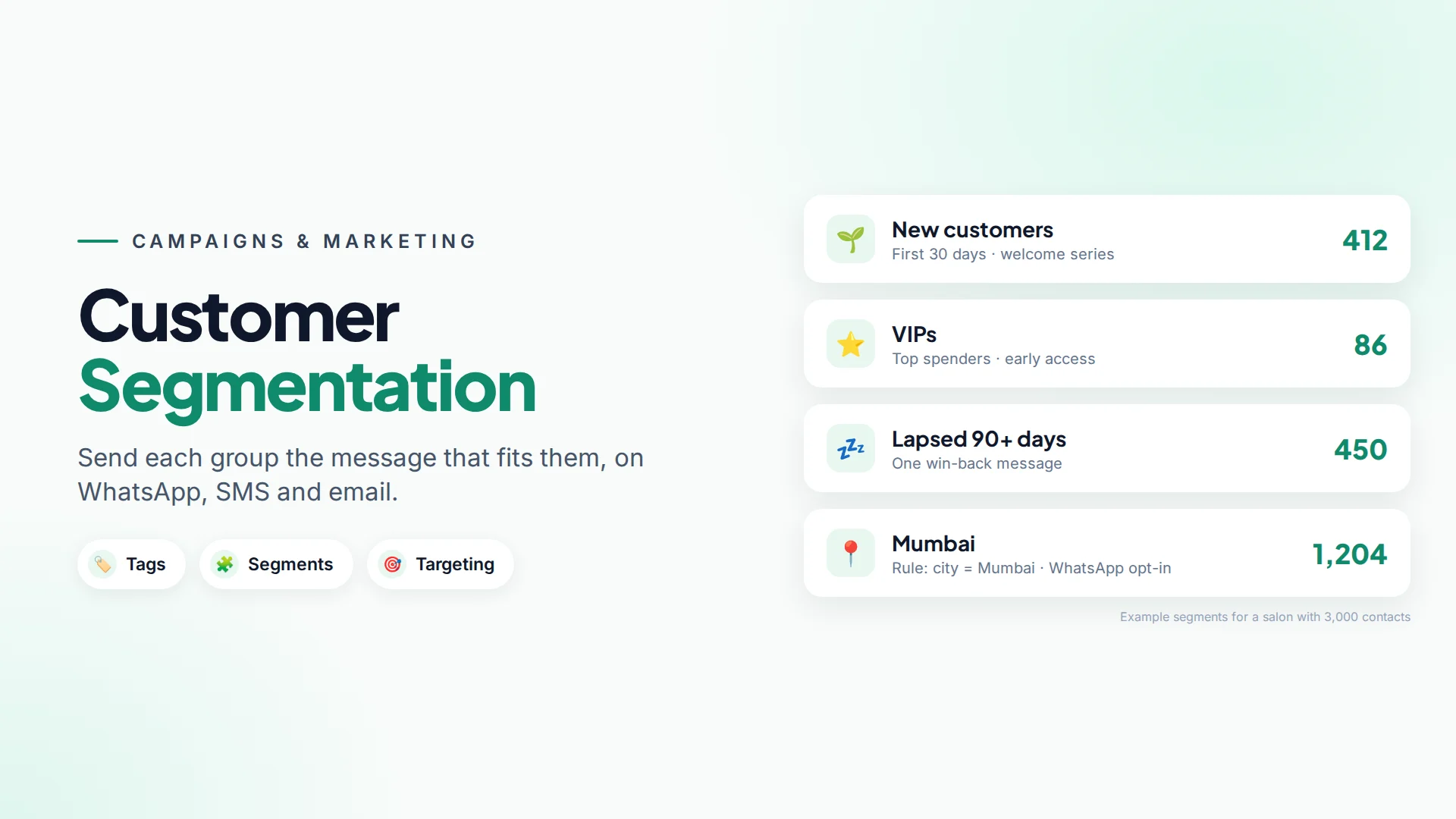
- New customers (first 30 days). Welcome message, how-to tips, a review request once they've had a good experience.
- Repeat customers. Early access, loyalty perks, "thanks for coming back".
- VIPs (top spenders). Personal offers, new arrivals first. Keep these messages personal and rare.
- Lapsed customers. No purchase or visit in 90+ days. One win-back message, then leave them alone if there's no response.
- Leads who haven't bought. Answers to common objections, a limited-time offer, a testimonial.
- By location. Store events, delivery updates, local weather or holidays.
- By interest. Tags like
skincare,haircareorkids-classes, collected from what people ask about. - By channel preference. Customers who opted in to WhatsApp vs only email. Send each group on the channel they chose.
For example, imagine a salon with 3,000 contacts. Instead of one "20% off" message to everyone, it sends a colour-treatment offer to the 600 tagged colour, a "we miss you" message to 450 lapsed clients, and nothing extra to clients who visited last week.
Static vs dynamic segments: what's the difference?
A static segment is a fixed list. You add people by hand or in bulk, and it only changes when you change it. Good for one-off lists, like "Diwali event attendees".
A dynamic segment is a set of rules, such as country = IN and WhatsApp opt-in = yes. Anyone who matches is included automatically, including new contacts. Good for ongoing groups you'll message again and again.
Most businesses end up with a few dynamic segments for everyday use and static segments for events.
Tags: the easiest way to segment
Tags are short labels on a contact, like vip, lead, colour or wa-offers-yes. They're the most flexible way to segment because anyone on your team, or an automation, can add them.
Good tagging habits:
- Agree a short list and write it down, so you don't end up with
VIP,vipandv.i.p. - Use lowercase and hyphens (
kids-classes). - Tag from conversations. When someone asks about a product, tag the interest.
- Let automations tag for you, for example tag everyone who replies to a campaign button with "Yes, interested".
How to build segments in Omni
In Omni, segments and tags work across all three campaign channels (WhatsApp, SMS and email) from the same contact list (contacts and segments guide).
- Tags: add them to one contact, to many at once from the contact list, or automatically with an automation step. The Tag added trigger can also start a flow, such as a welcome sequence when someone is tagged
vip. - Static segments: create a segment and add contacts to it, or select contacts in the list and choose Add to segment.
- Dynamic segments: add rules on fields such as country, language, source, name, email and the WhatsApp, SMS and email opt-in flags, combined with AND or OR. Membership updates automatically.
- Import with tags: when you import a CSV or Excel file, map a tags column so contacts arrive already segmented.
- Store data: if you connect a WooCommerce or other store, orders appear on each contact's timeline, and order and cart automations can tag buyers.
When you create a campaign, you choose a segment, a tag, selected contacts or an uploaded CSV as the audience, and Audience preview shows exactly who will get it. Contacts without opt-in for that channel are skipped automatically.
How to measure whether segmentation works
Compare the same message sent to a segment vs your whole list:
- Read rate and reply rate (WhatsApp)
- Open and click rate (email)
- Opt-outs and blocks
- Sales or bookings from the campaign's link or code
In Omni, campaign reports show queued, sent, delivered, read and failed counts per campaign, and you can export each recipient's status to CSV.
Common segmentation mistakes
- Too many tiny segments. Five good segments beat fifty you never use.
- Stale data. A "new customer" tag that never gets removed stops meaning anything.
- Ignoring channel opt-in. Email opt-in doesn't mean WhatsApp opt-in. Read WhatsApp opt-in: how to collect consent.
- Over-messaging your best customers. VIPs are valuable because they like you. Don't wear that out.
Sources
Frequently asked questions
How many customer segments should a small business have?
Start with three to five you'll actually use, such as new customers, repeat customers, lapsed customers and one or two interest or location groups. Add more only when you have a message for them.
What's the difference between a tag and a segment?
A tag is a label on a single contact. A segment is a saved group of contacts you target as one audience, which can be a fixed list or built from rules.
Can I use the same segments for WhatsApp, SMS and email?
Yes, in Omni the same contacts, tags and segments work for all three campaign channels. Each contact has a separate opt-in per channel, and campaigns skip anyone not opted in to the channel you're using.
Does segmentation reduce WhatsApp costs?
Yes. Meta charges for each marketing template delivered, so sending an offer only to the people it suits costs less than sending it to your whole list, and it lowers the risk of blocks.
How often should I update my segments?
Dynamic segments update themselves. Review tags and static lists every month or two, and remove labels that no longer apply.
- #customer segmentation
- #audience segments
- #tags
- #whatsapp campaigns
- #email marketing
The Omni Team
The Omni team builds the shared inbox, AI chatbots and automation tools businesses use to talk to customers on WhatsApp, Instagram and Messenger.
Put this into practice with Omni
One inbox for WhatsApp, Instagram and Messenger, with AI chatbots, campaigns and automation. Start on the free plan.